The Supplier Transaction Details form displays the details for an individual supplier transaction, such as an Invoice or Credit Note.
From Polygon Back Office, Select Accounts from the main menu, then select Supplier Transactions, Click New to create a new invoice or credit note, or, Highlight an existing invoice or credit note and click Change to open it.
|

The transaction details are grouped into five sections General, Stock Items list, Non-Stock Items list, Address and Notes. It is also possible to apply Purchase Orders to invoices using the Supplier Transaction Details form. These topics are described below.
When processing an invoice enter the following details in the General tab: •Supplier - Click on the browse button •Transaction Type - Set the transaction type to either Invoice or Credit Note. Credit Notes can be applied to an invoice at a later time see section Supplier Transactions File > Applying Credit Notes to Invoices for more information on this topic; •Date - Select today's date or another date. To enter a date using a Date Picker box, right click on the Date text box; •Invoice Number - Enter the Suppliers invoice number in the Invoice # field. This can include letters and/or numbers; •Description - Enter the description in the Credit Note Details or Invoice Details field. Alternatively select a description from the Supplier Transaction Description Pick List by clicking the pick list button •Credit Terms - After the invoice/credit note date is entered, credit terms are automatically entered depending on how this supplier has been configured. The entered credit terms can be manually adjusted as needed. See section Supplier Details > Financial Settings > Credit Terms for more information about configuring supplier credit terms. The credit term figure is used to identify invoices that are due and overdue for payment using the Forecasted Supplier Payments report and the Aged Creditors Report. See section Reports > Polygon Back Office for more information about these reports; •Stop Payment - The Stop Payment tick box is used to instruct the system to exclude outstanding invoices for this supplier from a Cheque Run. •Stock Invoice - Enabling or Disabling this option shows or hides the Stock Items list (described below). This option needs to be enabled if you are including stock items in your invoice. Note: If this supplier is set up as a Stock Supplier (see Supplier Details) then this setting will automatically be selected. •Tax Exclusive - Tick this box to mark the invoice as GST exclusive. Any GST payable will be calculated for GST Inc Items and added to the total cost. If this tick box is ticked, item prices should be recorded at their GST Ex price. GST payable on GST Inc items will be automatically added to the total at the top of the form. If this tick box is un-ticked, item prices should be entered at GST Inc prices. •The Sub Total, GST and Total are read only fields which are automatically calculated based on the quantity and cost of Stock/Non-Stock items as well as your GST settings.
|
 to select a supplier from the suppliers file pick list. Should an error be made and an invoice entered against an incorrect supplier, it may be re-assigned to the correct supplier by clicking on the browse box at the end of the supplier window, and choosing the correct supplier;
 ;
;
Entering Stock Items The stock items list is only visible if the Stock Invoice tick box is ticked for this transaction. This tick box is available from the General Tab described above. To enter a new stock item, first click on the Line Item button
Stock Item fields available are: •Item Code - This field is automatically entered when you add a stock item. Manually entering the item code will load the appropriate stock item details; •Description - This field is automatically entered when you add a stock item. It can also be edited; •Qty - Enter the quantity of stock items being purchased. This figure will be used to auto calculate the cost of this entry and adjust the stock balance for perpetual stock systems. •Loose Items - If this stock item is setup as a pack of individual units, e.g A case of beer. These are included as an addition to the quantity and also affect the calculated cost for these items. This figure will be used to auto calculate the cost of this entry and adjust the stock balance for perpetual stock systems. •Price - The price is automatically filled when you add the stock item but it can also be edited and the total purchase will be updated to reflect this. Please Note: If the Tax Exclusive tick box is ticked please ensure that you enter item prices using the GST Exclusive price of each item. The system will still display a GST Ex subtotal and add the amount of any GST separately before providing the total inclusive amount. Invoices will be marked to indicate ex GST prices. •Updating Stock Item Costs - If an item price is changed on this invoice you will be given the option to update the cost of the changed items in the Stock Items File. This means the next time a stock transaction is recorded, the newly entered costs will also be used. When a stock item's invoice price is changed, a tick box saying "Update the stock file costs with new item prices" is shown at the top of the Stock Items List. Un-tick this tick box if you do not want to update any of the Stock Item Costs. If you do want to update one or more stock item costs, tick this tick box. When the invoice is saved, the Update Invoice Item Details form will be displayed. This form allows you to select which items to update the cost for and which items to leave unchanged. •Discount - This is a cash value which will the transaction total will be reduced by. •Extended - Shows the total cost of this entry . That is the Quantity x Price + Cost of Loose Items - Any Discount •GST Type - The GST Type of this stock item is shown here. The following options are available GST Inc - General, GST Inc - Capital, GST Free and Input Taxed. See Also: Some Important Information About GST. •Deleting Items - Stock Items can be removed from this stock items list by highlighting the entry and clicking the Delete button to the right of the list.
|
 (at the left of the form) to access the Stock Items file, then select a stock item and click
Invoices can include items which have not been recorded as stock items. These items are not tracked perpetually and invoice information needs to be recorded manually. Examples of non-stock items are freight or cleaning products. Entering Non-Stock Item Details •Enter an item description. This can be typed directly into the Description Field or selected from a list of commonly used descriptions. To select from a list, press the Line Item icon •Select a ledger account to record this purchase against. To do this, enter an account code in the Code filed, or, click the Line Item •Enter the cost of this item in the Amount field; •GST Type - Options are GST Inc - General, GST Inc - Capital, GST Free and Input Taxed. See Also: Some Important Information About GST. Please Note: If you have tagged this supplier to “use ex GST prices” in the financial tab of the supplier record this will be displayed on the Invoice Items File as shown below. Please ensure that you enter the detail using the GST Exclusive price of each item. The system will still show the GST Inc total for the transaction and documentation will print showing each GST Ex line item and add the amount of any GST separately before providing the total inclusive amount. •Deleting Items - Non-stock items can be removed from the non-stock items list by highlighting the entry and clicking the Delete button to the right of the list.
|

The entry forms in the Polygon Back Office have been designed to offer the most time efficient method of data entry, that is, without the need to continually alternate your hand between the keyboard and mouse. For this reason, some of the entry fields are bypassed by the tab action of the keyboard (those fields not commonly used in each transaction). You may still select these fields by clicking with the mouse and enter data if desired. Advancement through the fields in the forms is by way of the TAB key on your keyboard. The UP and DOWN arrows are used to navigate to an item in a list, and once highlighted the ENTER key is used to select the item.
A new line item in a form may be added by using the SPACE BAR when the line item icon is selected...
…or by typing the Item Code directly into the Item Code entry field.
|

 | Applying Purchase Orders |
|
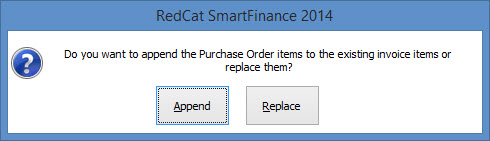
Previously created purchase orders can be applied to this supplier transaction. To do this click the Purchase Orders button at the bottom left of the form and select a purchase order from the Purchase Orders Pick list. If stock or non-stock items have already been added to this supplier transaction you will be asked if you want to append the purchase order items to the existing invoice items. Select Append to combine the purchase order items with the invoice items or select Replace to clear currently entered items and load items from the purchase order.
If the purchase Order has not been recorded as supplied, enter the Date Supplied then click the OK button.
See Also: Purchase Orders File
|
Clicking the print button lets you generate a report showing the information saved in this Supplier Transaction. Remember to save any new data by clicking OK before generating this report otherwise the new data will not be included. When you click the Print button a Report Selection Criteria window will be shown. This report can be saved, printed or converted to CSV format which can be loaded into spreadsheet programs.
|
Invoice address details are entered in this section. •Business Address - Enter the supplier's business address here. •Our Delivery Address - Enter the address where the items should be delivered to here. Note: Both address areas have a browse box
|
The Notes tab is a free form field which allows you to enter additional information relevant to this supplier transaction. Note: To easily see if notes have been entered for the supplier transaction. Look for a magnifying glass icon shown on the notes tab.
|
 If the magnifying glass icon isn't shown there are no notes for this item.
Polygon Back Office allows you to save the details of transactions which you will enter on a regular or recurring basis. Utilising this functionality will save data entry processing time. Transaction Frequency can be set to Daily, Weekly, Monthly, Quarterly or Yearly. New Recurring Transactions - To add a recurring supplier invoice into the system, fill in the Supplier Invoice Details as described above then click the Save as Recurring Transaction button at the bottom of the form. This will load the Recurring Transaction Details form where you can configure the details of this recurring transaction. Please note: The transaction will NOT be automatically recorded at the interval chosen. This is simply needed to calculate and display when the transaction was last processed and is next due for processing. Loading Recurring Transactions - To use a saved recurring transaction, click the Use Recurring Transaction button to select a transaction from the Recurring Transactions File.
Note: Recurring transactions are not available when the transaction type is set to Credit Note.
|
Polygon Back Office allows amortisation of supplier and client invoices, dividing up large payments and distributing them into smaller transactions over a series of weeks or months. This improves profit and loss reporting because large once off payments can be partially included in all quarters rather than being reported as one large figure. See section Amortisation of Client and Supplier Invoices Through Prepayments for more information on this topic.
|
See Also:
Polygon Back Office > Suppliers File
Polygon Back Office > Supplier Transactions File
Polygon Back Office > Recurring Transactions File
Polygon Back Office > Purchase Orders File
Getting Started with Polygon Back Office
Polygon Inventory > Stock Items File