Stock items are items that you purchase from suppliers for use in your business. In order to operate a fully perpetual stock control system, stock items need to be created and linked to PLUs or recipes. The Stock Item Details form allows you to configure new Stock Items or modify existing Stock Items.
From Polygon Back Office, Open the Stock Items File by selecting Stock from the main menu, then select Stock Items, or, Click on the Stock Items button on the toolbar, Then click the New button and select Stock Item to create a new Stock Item, or, Highlight an existing Stock Item and click New From to create a new Stock Item based on the selected Stock Item, or, Select an existing Stock Item and click Change to modify the selected Stock Item.
|

The information on the Stock Item Details form is grouped into five main groups, General, Stock Control, Recipe Costing, Point Of Sale and Location Specific Details. These groups are described below.
 | General Tab |
General Item Name Enter the description for this stock item. Handy Hint: It is recommended that size of the item be included in the description to make it easier to differentiate between similar stock items. For example, ‘Coke 375ml’ and ‘Coke 600ml’.
Stock Type If you need to change the stock type, click on the browse button
Active This setting is selected automatically and enables the Stock Item to be used. However, if you no longer sell or use an item, it can be made inactive by de-selecting this setting. This is useful when you have a large repertoire of menu items, some of which are not for sale at any given time. Instead of deleting items you do not currently sell, but may sell in the future, simply tag the items as not active (inactive) and they will be retained.
GST Type You must choose the GST type applicable to this item from one of the four ‘GST types’ available. GST Inc is the default setting for a stock item. Note: Items defined as GST Free should be separated into a Revenue Account reserved specifically for GST Free items.
Preferred Supplier This is where you can specify a supplier which is frequently or always used when purchasing this stock item. The selected supplier will be automatically entered for stock transactions for this Stock Item. Select a supplier by clicking the browse button
Supplier Codes Supplier codes are used by suppliers to identify their products. A list of supplier codes for each stock item can be kept and then included on purchase orders based on which supplier the purchase order is for. Supplier Codes for this Stock Item can be entered from the Supplier Codes File by clicking the Supplier Codes button. This will load the Supplier Codes File. See section Polygon Inventory > Supplier Codes File for more information about managing Supplier Codes.
Location Stock Items used in multi-location installations of Polygon POS Management can be limited so they are only available at some locations. To select which locations this stock item will be available to, click the browse button
Ledger Accounts Stock Account This is the asset account which will be affected by movement of this stock item. Click the browse button For Multi-Department Users: – Ensure that you choose both the Department and the Asset account you require from the Chart of Accounts Pick List.
Our Item Stock Code If you have your own coding system for stock items, an item stock code from this system can be entered in this field.
Cost/Expense Account This is the expense or cost account which will be affected by movement of this stock item. Click the browse button to select the appropriate Expense/Cost Account. Multi-Department Users – Ensure that you choose both the Department and the Expense/Cost account you require. Remember that if you are using Polygon Inventory (or any other perpetual stock system) any stock purchases you make are an asset. When the stock is used or wasted, the usage or wastage becomes an expense/cost and the asset account is reduced accordingly.
Stock Item Flags Enable item to be used in recipes This setting will allow a portion of the stock item (eg. 100ml) to be sold as part of a Recipe. See section Polygon Inventory > Recipes File for more information about Recipes.
Track this item perpetually This this tick-box to enable perpetual stock control functionality for this stock item.
This item is counted during stocktakes Ticking this setting will include this stock item in all stocktake reports.
|
 and select the desired stock type.
This tab allows you to set the perpetual stock and stocktake parameters and records information needed for the generation of stock re-order reports. Franchise model installations can also program different Stocktake Measures (SMU) for different locations from the Location Specific Details tab which is described later on this page.
Pack Details Stocktake Measure Unit (SMU) Select the appropriate stocktake measure, selecting Kilos or Litres indicates that this item is a 1 unit pack which is either one Kilo or one Litre. For more complicated packaging select the Other option and fill in the Units Per pack and Pack Weight/Volume . (If you choose the Other option, it is recommended that you be specific with the description. In the example shown, this item has been described as Other – 24 x 375ml Cans. This detail is printed on reports and stocktake forms and will help avoid any confusion when doing your physical count.)
If you will be using a PDE (Portable Data Entry) device to record your stocktake details and download the data directly into the stocktake files, press the Stock Item Barcodes button to record the barcode details of this stock item in the Stock Item Barcodes File. See Also: Using PDE Devices
Pack Costing(GST Exclusive) Enter the Pack Cost and Pack Weight, Units per Pack (Pack Weight and Units per Pack only required if you have selected Other for the SMU). For example, the Pack Weight for a 24 can carton of beer would be 24 x 375ml = 9 litres – this would be entered as 9.000. The Units per Pack in this case would be 24.) Notice that the system automatically calculates the cost of the stock item both by the Unit and Kilo/Litre and displays them for your information. The Pack Cost you enter will be the GST exclusive price you pay for the item.
Pack Cost Enter the cost of purchasing this stock item in one of the two available text boxes. Enter a GST Inc figure in the first text box and the second text box will automatically show the GST Ex figure. Or enter a GST Ex figure in the second text box and the GST Inc figure will be displayed in the first text box.
Units per Pack This is the amount of individual units available for sale with the ‘pack’. For example, a case of beer contains 24 individual units
Unit Cost This will be automatically calculated by the system by dividing the ‘pack cost’ by the ‘units per pack’. For example, a case of beer that costs $24 and contains 24 units will have a unit cost of $1.
Cost per Kilo or Litre This will be automatically calculated by the system dividing the cost by the weight.
Average Cost (GST Exclusive) Current Average Cost This cost reflects the average purchase price of this stock item based on all previous transactions. That is, if a stock item has been purchased for $10 on the first occasion and then purchased for $20 on the second occasion, the current average cost will be $15. This figure is automatically filled by Polygon Inventory.
Stock Levels(measured in packs) Par Level The par level is the level at which stock is replenished. If the stock quantity falls below this quantity the system can automatically generate invoices to bring the stock quantity back to the par level.
Current Balance Shows the balance of this stock item as currently calculated by the system.
|

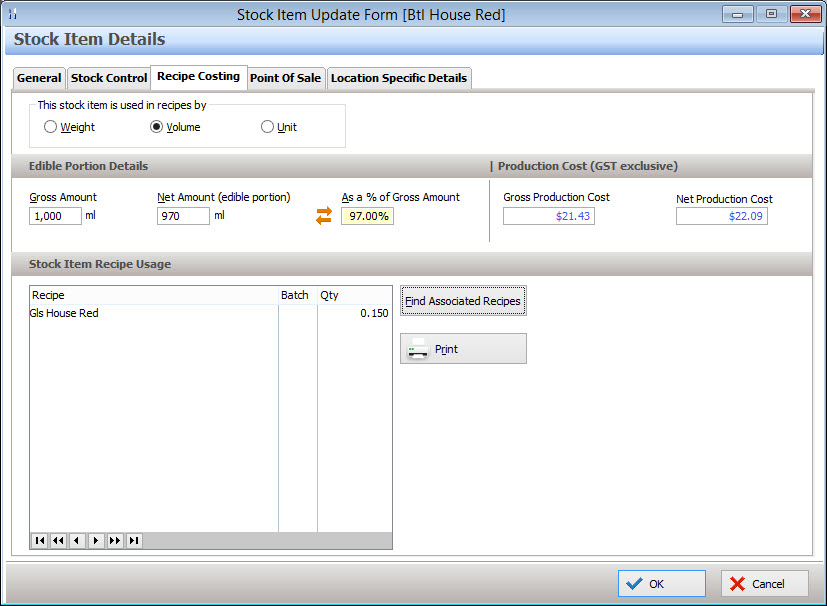
Information entered in this tab determines how this stock item is used in recipes. See section Polygon Inventory > Recipes File for more information about Recipes.
This stock item is used in recipes by Select how you would like this stock item to be measured in recipes: •Weight (g) - Select this measure if the stock item is measured by weight. •Volume (ml) - Select this measure if the stock item is measured in litres •Unit - Select this measure if the stock item measured by Unit(s). E.g A case of beer would have 24 Units
Edible Portion Details Gross Amount This is the total amount available for use. For example, a keg of beer comes in a 60L keg.
Net Amount (edible portion) This is the total amount that is actually used, after wastage. For example, it is generally accepted that a 60L keg of beer will have a wastage amount of 1.8L; therefore the Net Amount or Edible Portion is 58.2L.
As a % of Gross Amount This is another method of calculating the Net Amount (edible portion). You can specify that a certain percentage of the Gross Amount will be used. For example, if wastage is deemed to be 3%, then 97% of the Gross Amount is actually being used.
Production Cost (GST Exclusive) Gross Production Cost This figure is automatically filled and reflects the cost of producing the Gross Amount, rounded to the nearest cent.
Net Production Cost This figure is automatically filled and reflects the cost of producing the Net Amount (edible portion), rounded to the nearest cent.
Stock Item Recipe Usage If you need to know which recipes, batch recipes or functions this particular stock item has been included in then click on the Find Recipes That Use This Stock Item button. Polygon Inventory will search the database and display the results. A hard copy of the search results can be obtained by pressing the Print button.
|
This is where you can link the Stock Item to a PLU or multiple PLUs. This link is required to run a fully perpetual stock control system. When a PLU is sold at the POS Terminal this link ensures the stock level of the stock item is updated accordingly when the sales are processed at the BOH. Note: This link can also be established when creating a PLU (See PLU Item Details > Polygon Inventory tab ).
Assigning a PLU to a Stock Item: •Click on the Assign PLUs button; •The PLU File will be displayed; •Select the PLU you wish to link; •If you wish to link more than one PLU, click on the multi-select tick-box and then make your selections; •To add PLU(s) to an existing list, tick the append selection check box on the PLU File; •Click the Select button to add links to the selected PLUs; •Click the OK button to save these changes.
View Assigned PLU This will display the PLU Update form for the highlighted PLU. Note: You will not be able to modify the PLU because it will be in read-only format. Modifications can be made from the Polygon POS Management > PLU File
Delete Assignment This will remove the selected PLU from the assigned PLU items list. This PLU will no longer be linked to this stock item.
Delete All Assignments This will remove all assigned PLUs from the assigned PLU items list, meaning the stock item will not be linked to any PLUs.
|

If you use a multi-location database, each stock item can be configured differently for each location. The Location Specific Details tab displays the same settings from the General, Stock Control and Recipe tabs as documented above. It allows you to create different location dependant settings for stock item. Meaning that you can change the preferred supplier, pack cost etc for one or more sites.
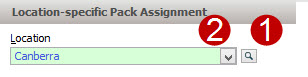
Before changing settings for an individual location the location must be added to the location list. To do this, click the browse button
Each location in the list box needs to be selected and configured separately. To change settings for a location, click on the down arrow
|


If PDE (Portable Data Entry) Devices have been enabled from the Polygon Inventory Applicaion Settings, a button labeled Upload Stock Items to PDE Device is shown at the bottom of the Stock Items File. Clicking this button will load the PDE Interface Update form where you can upload your stock items list and barcodes to PDE devices to prepare them for stocktaking. See section Polygon Inventory > Using PDE Devices for instructions explaining how to enable and use PDE devices for stocktaking.
|
See Also:
Polygon Inventory Introduction
Polygon Inventory > Getting Started with Polygon Inventory
Polygon Inventory > Using Polygon Inventory
Polygon Inventory > Stock Items File
Polygon Inventory > Recipes File
Polygon Inventory > Using PDE Devices
Getting Started with Polygon Back Office