If you have the ‘Enable Cash Drawer Management’ Polygon POS Management Application Setting ticked, a staff member who has been given the Cash Drawer Manager privilege must assign each cash drawer to a specific staff member at the beginning of a shift, and finalise the drawer and log the staff member off at the end of the shift.
Note: You will also need the 'Open cash drawer upon sale settlement' setting enabled (see section POS Peripherals > Cash Drawer)
The Enable Cash Drawer Management setting is available from - Polygon POS Management > Application Settings > Polygon POS Management > Z-Read - General
The Cash Drawer Manager privilege can be assigned to POS Staff from - Polygon POS Management > POS Staff Details
During the shift, the only other staff member who may access the drawer (finalise sales or use the no-sale key) is the Cash Drawer Manager. Each instance of Cash Drawer Manager usage is logged and reported on the Exceptions Report. The Exceptions Report is accessible from Polygon POS Management Reports > Admin > Exceptions Report.
To use this feature, a Drawer Log On/Off button must be added to one of the product keypads. See section Polygon POS Management > Product Keypad Details for more information about adding keypad buttons.

The user with Cash Drawer Manager privileges needs to logon and do the following: •Click on the Drawer Logon/Off button •Click on the Drawer Logon/off button •Enter your password and then click OK •This will display the Cash Drawer Management form shown bellow
•Click the Log On button; •Select the staff member to assign this cash drawer to and click OK •Click Close to Save
|
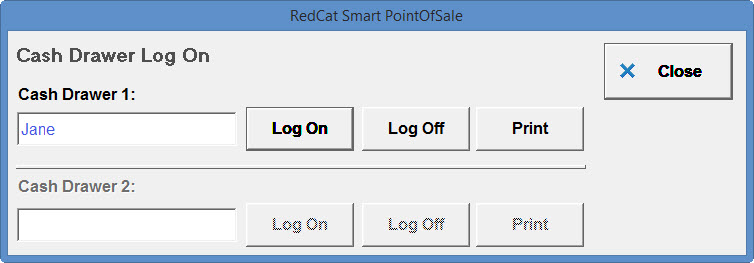
•Click on the Drawer Logon/off button •Enter your password and click OK •This will display the Cash Drawer Management form shown below
•Click on the Print button •The Drawer Z-Read Report (Staff Name) for the relevant drawer will be displayed. •Click on the Print button to print the report, otherwise choose the Close button to exit the report without printing.
|
•Click on the Drawer Logon/off button •Enter your password and click OK •This will display the Cash Drawer Management form.
•Click on the Log Off button •Press Yes to confirm •The Drawer (#) Reset Report (Staff Name) is printed, and the system will advise that the reset was successfully processed. •The contents of the drawer should be reconciled to the Drawer (#) Reset Report (Staff Name). The sum of the Drawer Reset Reports for the trading day should equal the Till Reset Report for the same trading day.
|
 for the relevant Cash Drawer.
See Also:
FOH > Entering a Sale - The Product Keypad Screen
FOH > Finalising a Sale - The Bill Settlement Screen
FOH > Closing Procedure - Reconciling and Resetting the Terminal
Polygon POS Management Introduction
Polygon Back Office Introduction